
How to photograph jewellery with a smartphone
Create clear and faithful jewellery photographs with practical advice on light, reflections, framing and useful views, illustrated through six catalogue examples.
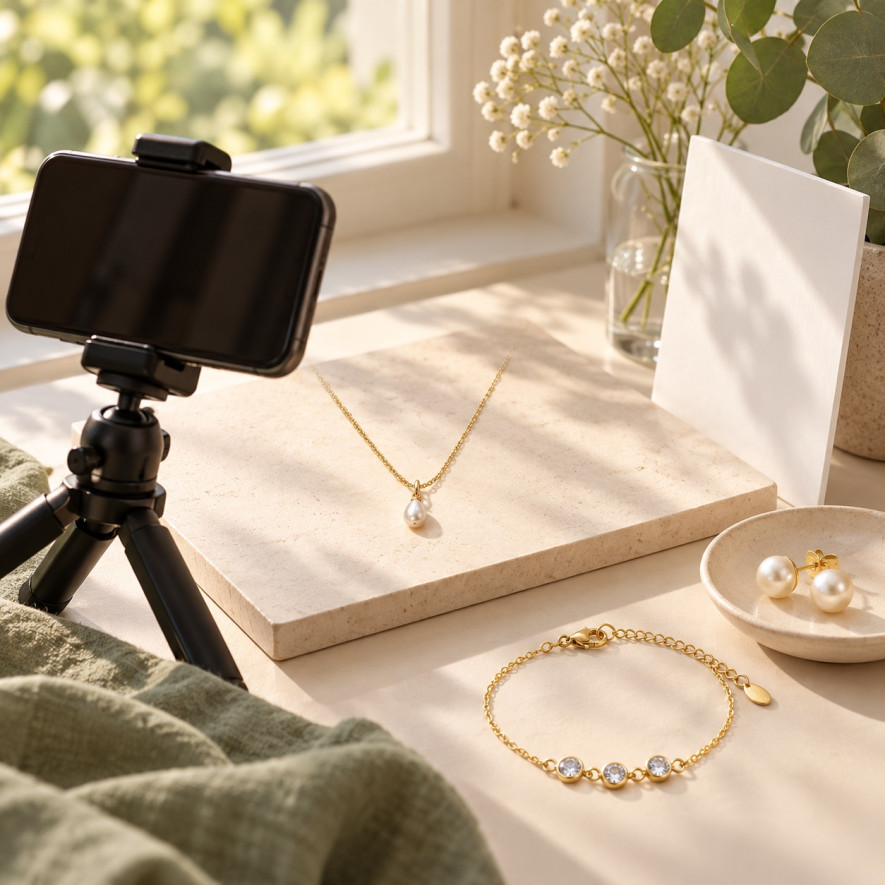
Good jewellery photography makes shape, colour and details understandable. Begin with a window, a stable support and a plain background before deciding whether more equipment is needed.
For a shop or social account, aim for a coherent, faithful series. Close-ups do not establish actual dimensions, so photographs should complement written specifications.
Prepare a repeatable small workspace
Choose soft consistent light
Place the jewellery near a window away from a direct beam. Observe reflections and gently change the object or phone angle until the surface remains readable.
Avoid mixing very different light colours during one series. Test a single main source and compare the image with the actual object before adding more lamps.
Keep the background simple
Choose a clean matte background that separates the product’s outline. Our gold- and silver-coloured jewellery guide provides context for describing colour separately from composition.
Check that filters have not shifted the metal towards copper or turned white decorations blue. Preserve natural surface detail rather than removing every reflection.
Clean and sort the products
Clean the lens and prepare items by reference. Follow our jewellery care guide and each product’s instructions instead of using an aggressive cleaning treatment.
Set up your phone for a clear image
Phone features vary by model and application. Start in the normal photo mode, consult the manufacturer’s guidance and change one setting at a time while testing.
| Situation | Starting point | Check |
|---|---|---|
| Blur | Stabilise the phone | Fine details |
| White reflections | Reduce exposure | Visible texture |
| Inconsistent colour | Simplify lighting | Compare with the object |
| Distorted shape | Move back slightly | Proportions |
| Clutter | Remove props | Product clarity |
Stabilise the phone
Support the phone securely or use a small tripod. A timer can reduce movement, where available; enlarge the captured image to inspect detail rather than trusting a thumbnail.
Focus on the useful detail
Tap the important area to focus if your phone supports this. Move back if it cannot focus closely: a sharp wider image is more useful than a blurred enlargement.
Adjust brightness carefully
Keep bright metal readable rather than uniformly white. Exposure controls vary; on supported iPhones, manual focus and exposure adjustments are described in Apple’s camera guidance.
Check your first result
Check the first image at the size your customers will see. Correct the lighting, colour and framing before repeating the same setup across a whole collection.
Six exercises with catalogue models
Round pearl-style studs
The pearl stud earrings 11137538-2 have gold-coloured stainless-steel settings and white decorative pearls. Their listed size is 1.2 cm and they are sold as a pair. Show or check the fastening as well as the front. Their appearance does not establish that the pearls are natural.
A fine drop-pendant necklace
The drop-pendant necklace 50980723 has a fine gold-coloured stainless-steel chain, a white pearlescent-looking pendant and a lobster clasp. The listed chain measures 39 cm with a 5 cm extension. Check its position when worn; the decorative appearance does not establish natural mother-of-pearl composition.
An open twisted-wire ring
The double twisted-wire ring 11324925-2 has two parallel gold-coloured stainless-steel bands and an open adjustable design. No numbered adjustment range was given in the description checked. Ask about fit when this is important, and do not assume that an open ring fits every finger.
A bracelet with polished beads
The fine bead bracelet 11138909 has polished beads of two sizes on a gold-coloured stainless-steel chain. Its listed length is 16 cm with a 5 cm extension and a lobster clasp. Compare those measurements with the required fit rather than judging size from the photograph.
A bracelet with three rhinestones
The three-rhinestone bracelet 10201217 features three round decorative stones on a fine gold-coloured stainless-steel chain. It measures 17 cm with a 5 cm extension according to the description. Keep its specifications separate from similar bracelets: the rhinestones are decorative elements, not a statement that the product contains diamonds.
Small textured hoop earrings
The small beaded hoops 10969603-12 are gold-coloured stainless steel, with a hinged post, a listed size of 1.8 cm and sale by the pair. Their rounded beads create texture. Compact size alone does not establish weight or guarantee comfort; inspect the fastening and the wearer’s requirements.
Create views that answer buying questions
A clear main product view
Make the main image show the complete item and the number of pieces sold. Styling accessories should not leave customers uncertain about what the purchase includes.
Details that explain function
Add views of clasps, extensions, ring openings and earring backs. Our bracelet guide helps distinguish shapes that need different presentation angles.
A worn view for context
A worn image gives context without replacing measurements. Obtain the model’s agreement for the intended use, and keep earrings visible without exaggerating their scale through perspective.
Edit for clarity while preserving the product
Correct framing and exposure
Straighten, crop and adjust brightness only when this improves fidelity. Compare the edited image with the original and the actual item, checking small attachments carefully.
Keep commercial features intact
Do not add stones, erase a ring opening or change a finish for visual consistency. Retake a photograph when a correction would reconstruct rather than clarify the product.
Keep originals and separate export copies, named with the reference and view. This reduces confusion between similar variants and makes later corrections easier to manage.
Build a routine for your shop
Begin with a short series and note what works. Keep the background and phone position repeatable, buying accessories only when they solve an observed problem.
Before publishing, verify the reference, compare image and description, and inspect the crop on different screens. Complementary faithful views answer more questions than one heavily processed photograph.
Jewellery photography questions
Is a smartphone enough to begin?
A smartphone can produce useful images when stability, lighting and focus are controlled. Test your actual products before deciding whether another camera is necessary.
Should you use the phone flash?
Begin without flash under soft light. A phone flash may create difficult reflections on some pieces; compare results rather than relying on a rule for every situation.
Must every background be white?
A white background is suitable if edges remain clear. Very pale details may need another background or different light; consistency should not hide the product.
How many photographs are useful?
Use enough views to explain shape, scale and attachments. The right number depends on the model; remove duplicates and add images that answer different questions.
Can generated images replace product photographs?
Commercial images must describe the actual item. Generated illustrations may alter details or proportions; keep them clearly editorial and retain faithful photographs for product decisions.
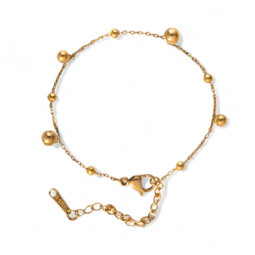
Gold Fine Chain Bead Bracelet 11138909
Fine gold-tone stainless steel chain bracelet dotted with polished beads of two sizes. Light and feminine.
Price €3.54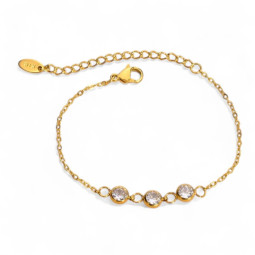
Gold Fine Three Rhinestone Bracelet 10201217
Fine gold-tone stainless steel chain bracelet with three bezel-set round rhinestones. Delicate and bright.
Price €5.04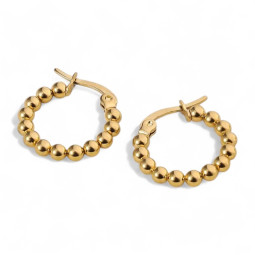
Gold Small Ball Hoop Earrings 10969603-12
Small gold-tone stainless steel hoops made of large, tightly packed beads. A mini size full of relief.
Price €3.00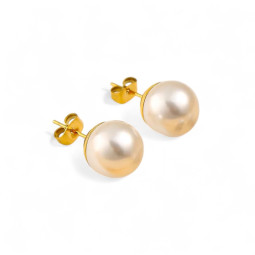
Gold Pearl Stud Earrings 11137538-2
Gold-tone stainless steel stud earrings set with a large round white pearl. Timeless, elegant and easy to wear.
Price €1.68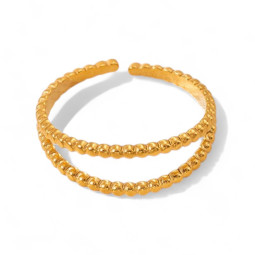
Gold Double Twisted Wire Ring 11324925-2
Slim open gold-tone stainless steel ring made of two parallel twisted bands, set slightly apart.
Price €2.52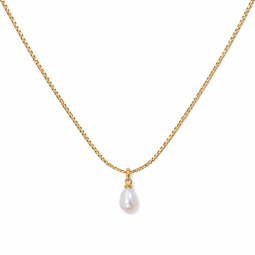

Gold-tone necklace with a pearlescent drop pendant 50980723
A small white pearlescent-look drop finishes this fine gold-tone stainless steel necklace with a lobster clasp and extension chain.
Price €4.68
Leave a comment